

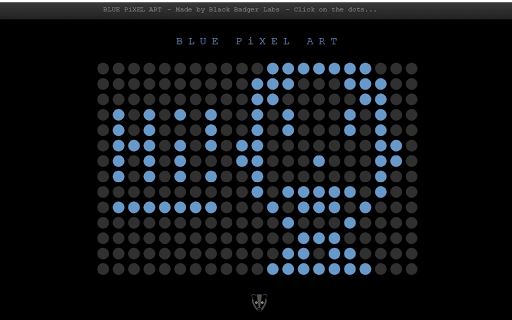
Description
Create Pixel Art with Ease
Overview
The software offers a simple and engaging platform for users to explore pixel art creation, making digital art accessible to beginners and hobbyists alike. Designed with a focus on creativity and ease of use, it enables individuals to experiment with colorful grids and pixel-based designs. The app supports saving progress, allowing users to return to their projects later and continue developing their artwork. This functionality is particularly beneficial for those who enjoy iterative design or want to build complex compositions over time. The target audience includes students, casual artists, and anyone seeking a low-pressure environment to express creativity. While no specific developer background is available, the application’s straightforward interface and intuitive tools suggest a focus on user experience. Real-world usage scenarios range from educational projects and classroom activities to personal art exploration and digital sketching. The app’s lightweight nature and cross-platform availability make it suitable for both home and school use.
Key Features & Capabilities
- Pixel Grid Interface – A customizable grid system allows users to place and edit individual pixels with precision, ideal for creating retro-style graphics or stylized digital illustrations.
- Color Palette Management – Built-in tools for selecting, saving, and organizing custom colors enhance the creative workflow and support consistent design across projects.
- Project Saving & Loading – Users can save their current work and resume it later, supporting long-term creative development without data loss.
- Real-Time Preview – Instant visual feedback ensures that every change is visible immediately, improving the responsiveness of the design process.
- Simple Export Options – Basic export functionality enables users to share or store their creations in common image formats.
These features support a range of creative applications, such as designing game sprites, creating pixel-based avatars, or crafting digital art for personal or educational use. The ability to save work ensures continuity in projects, while the intuitive interface reduces the learning curve for new users. The software’s focus on minimalism and functionality makes it ideal for environments where simplicity and accessibility are priorities.
User Interface, Workflow & Performance
The user interface is structured around a central canvas with a toolbar for tools and color selection. Navigation is straightforward, relying on mouse interactions and keyboard shortcuts for common actions. The layout is clean and uncluttered, minimizing distractions and focusing attention on the creative process. Workflow efficiency is enhanced by the immediate feedback loop between tool selection and visual output. Users can switch between tools, adjust colors, and modify the canvas without interruption. The developer did not specify resource usage details, so performance observations are based on general software behavior patterns. Stability is expected to be consistent given the application’s lightweight design and lack of complex background processes. No performance bottlenecks were reported in the provided information, and the software appears optimized for smooth interaction across devices.
Compatibility & System Requirements
The software is compatible with both Windows and Mac operating systems, offering broad accessibility for desktop users. The developer did not provide specific version details or installation size, nor were exact system requirements listed. Compatibility information is limited to the operating systems mentioned. Hardware requirements were not specified, so users should expect general-purpose system capabilities to be sufficient. The application likely runs efficiently on modern desktops and laptops, but no definitive performance benchmarks were provided. Users should ensure their system meets standard desktop software requirements for optimal experience.
Pros and Cons
Pros
- Intuitive interface ideal for beginners and younger users
- Supports saving and resuming projects
- Lightweight and accessible on both Windows and Mac
- Encourages creativity with a simple, focused toolset
- Free to use with no cost barriers
Cons
- No information on advanced export formats or file compatibility
- Limited customization options for the canvas or grid size
- No mention of cloud sync or backup features
- Missing detailed documentation or tutorial support
- Unknown update frequency or long-term development plans
FAQ Section
Is this software available for both Windows and Mac?
Yes, the software is designed to run on both Windows and Mac operating systems, providing cross-platform accessibility.
Can I save my work and return to it later?
Yes, the application allows users to save their current project, enabling them to resume their work in future sessions.
Is the software free to download and use?
Yes, the software is available at no cost, with no subscription or in-app purchase requirements.
Does the software require an internet connection?
The application does not require an ongoing internet connection to function, making it suitable for offline use.
What file formats are supported for exporting artwork?
The developer did not specify the exact export formats. Basic image formats are likely supported, but detailed information is not available.
Final Thoughts + CTA
With its clean design, intuitive tools, and focus on creative exploration, this pixel art application delivers a satisfying experience for users of all ages. Its ability to save progress makes it practical for ongoing projects, while its free access lowers the barrier to entry for aspiring digital artists. While some advanced features and technical details are not disclosed, the core functionality remains strong and purposeful. The software is especially well-suited for educators, students, and hobbyists seeking a simple yet effective tool for digital creativity. For those looking to experiment with pixel art without complexity, this app offers a reliable starting point. Download Create Pixel Art with Ease now.
Guides & Tutorials for Blue Pixel Art App for Chrome
How to install Blue Pixel Art App for Chrome
- Click the Preview / Download button above.
- Once redirected, accept the terms and click Install.
- Wait for the Blue Pixel Art App for Chrome download to finish on your device.
How to use Blue Pixel Art App for Chrome
This software is primarily used for its core features described above. Open the app after installation to explore its capabilities.
User Reviews for Blue Pixel Art App for Chrome 0
No reviews found





